
How to Create a Gmail Account (Step-by-Step Guide 2026)
A Gmail account is one of the most useful online tools you can have. It allows you to send and receive emails, access Google Drive, YouTube, Google Photos, Google Meet, Google Docs, and many other Google services with a single account.
Whether you’re creating your first email address for school, work, or personal use, this guide will walk you through every step in simple language.
Why You Need a Gmail Account
A Gmail account is more than just an email address. It gives you access to an entire ecosystem of Google services.
With one account, you can:
- Send and receive emails
- Store files in Google Drive
- Watch and comment on YouTube
- Join Google Meet video calls
- Download apps from Google Play (Android)
- Save contacts and calendar events
- Back up photos and documents
Before You Start
Make sure you have:
- A smartphone, tablet, or computer
- A stable internet connection
- A mobile phone number (recommended for security)
- Your full name and date of birth
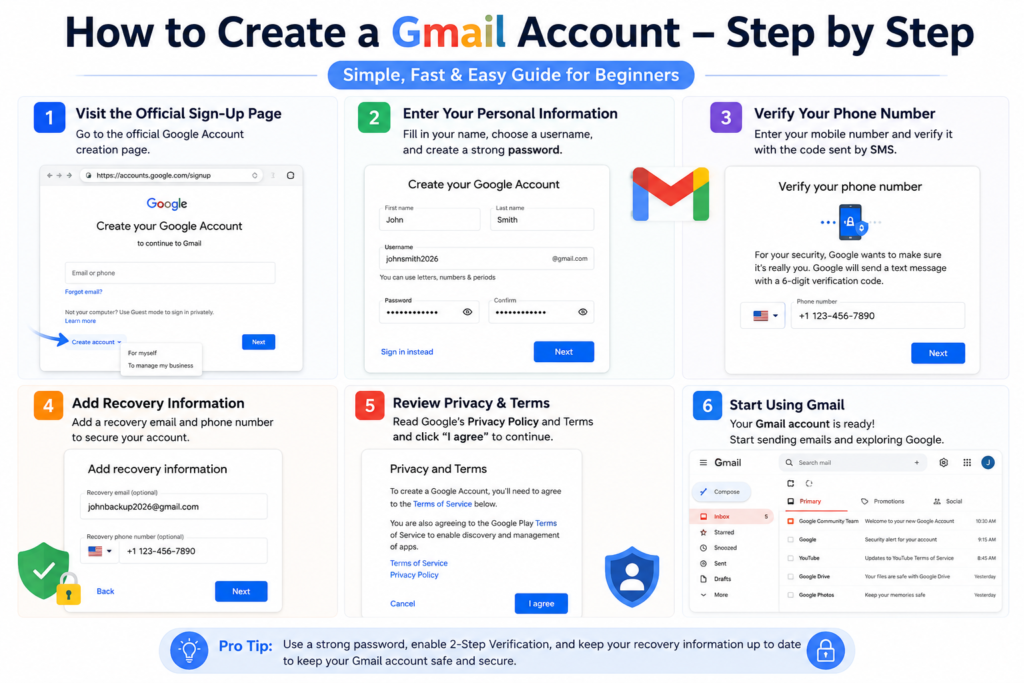
Step 1: Visit the Official Gmail Sign-Up Page
Open your preferred web browser and visit Google’s official account creation page.
Click Create account.
Choose whether the account is for:
- Personal use
- Your child
- Business use
Select the option that matches your needs.
Step 2: Enter Your Personal Information
Fill in the required details:
- First name
- Last name
- Preferred Gmail username
- Strong password
Choose a username that is easy to remember and professional if you plan to use it for work or job applications.
Example:
Avoid usernames with random numbers or unnecessary symbols.
Step 3: Verify Your Phone Number
Google may ask you to verify your identity using a mobile phone number.
Enter the verification code sent by SMS.
Phone verification helps:
- Protect your account
- Recover your password
- Prevent unauthorized access
Step 4: Add Recovery Information
You can improve your account security by adding:
- A recovery email address
- A recovery phone number
If you ever forget your password, these recovery options can help you regain access.
Step 5: Review Google’s Privacy Information
Read the privacy and terms information.
Understand:
- How your data is used
- Security features available
- Privacy settings you can control
Once you’re satisfied, accept the terms to continue.
Step 6: Start Using Gmail
After creating your account, you’ll be taken to your Gmail inbox.
From there, you can:
- Compose your first email
- Organize messages into folders
- Star important emails
- Search for old conversations
- Attach files and images
How to Send Your First Email
- Click Compose.
- Enter the recipient’s email address.
- Add a subject line.
- Write your message.
- Attach files if needed.
- Click Send.
How to Keep Your Gmail Account Secure
Protect your account by following these tips:
- Use a strong, unique password.
- Enable two-step verification.
- Never share your verification code.
- Keep your recovery information up to date.
- Avoid signing in on public computers.
Common Mistakes to Avoid
Choosing a weak password
Create a password with a mix of letters, numbers, and symbols.
Ignoring recovery options
Recovery information can save your account if you forget your password.
Clicking suspicious email links
Be cautious of phishing emails asking for passwords or personal information.
Sharing verification codes
Google will never ask you to share verification codes with anyone.
Tips for Managing Gmail Efficiently
- Archive emails you don’t need immediately.
- Use labels to organize messages.
- Search using keywords instead of scrolling.
- Unsubscribe from unwanted newsletters.
- Empty your spam and trash folders regularly.
Frequently Asked Questions
Is Gmail free?
Yes. A personal Gmail account is free to create and use.
Can I have more than one Gmail account?
Yes. Many people use separate accounts for personal, work, or school purposes.
Can I use Gmail on my phone?
Yes. Gmail works on Android, iPhone, tablets, and desktop computers.
What should I do if my preferred username is unavailable?
Try adding your middle name, initials, or a meaningful number while keeping the address professional.
Is Gmail safe?
Google includes multiple security features, but you should still use a strong password and enable two-step verification.
Final Thoughts
Creating a Gmail account only takes a few minutes, but it opens the door to many useful online services. By choosing a secure password, enabling account recovery, and following good security practices, you’ll have a reliable email account that you can use for education, business, shopping, and everyday communication.
If you’re new to the internet, Gmail is one of the best places to start because it provides secure access to many essential Google services through a single account.