
How to Speed Up Any Android Phone: 10 Proven Tips That Actually Work
A slow Android phone can make even simple tasks frustrating. Apps take longer to open, games lag, and switching between apps becomes difficult. The good news is that you don’t always need to buy a new phone. In many cases, a few simple changes can significantly improve your phone’s performance.
In this guide, we’ll explain 10 proven tips that can help almost any Android phone run faster.
- Restart Your Phone Regularly
Many people rarely restart their phones. Restarting clears temporary files, stops unnecessary background processes, and refreshes your device’s memory.
Tip: Restart your phone at least once every week.
- Free Up Storage Space
When your phone’s storage is nearly full, performance usually drops.
You can free up storage by:
- Deleting unused apps
- Removing duplicate photos
- Clearing downloaded files you no longer need
- Moving videos to cloud storage
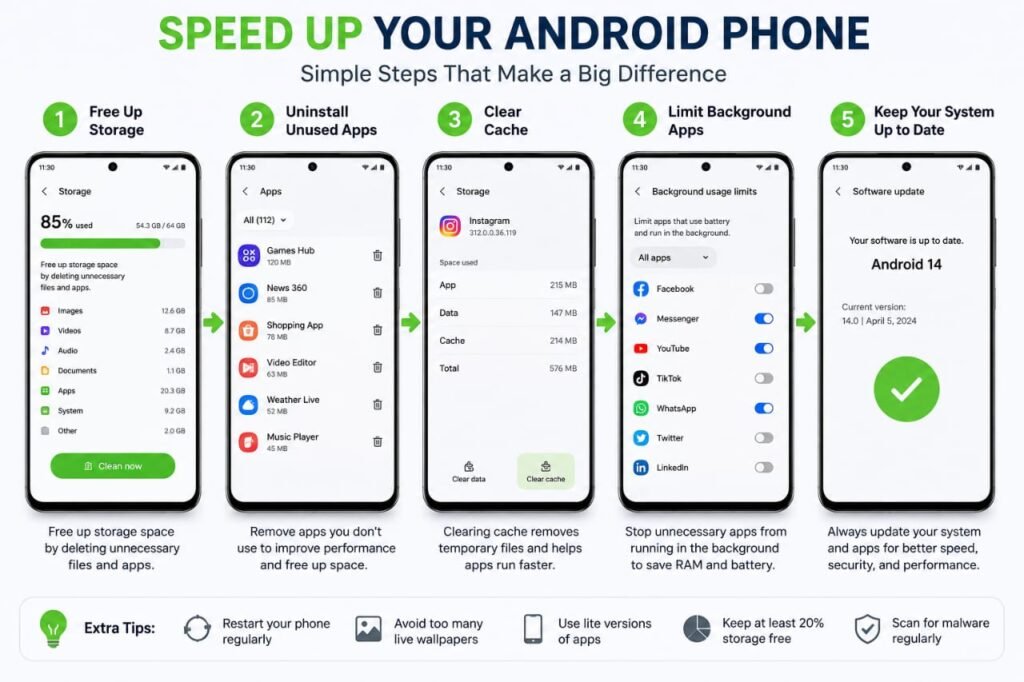
Try to keep at least 20% of your storage free for better performance.
- Remove Apps You Don’t Use
Many phones contain apps that are never opened.
Go to Settings → Apps and uninstall applications you no longer need. Fewer apps mean fewer background processes and more available resources.
- Clear App Cache
Apps store temporary files called cache. Over time these files can become very large.
To clear cache:
- Open Settings
- Tap Apps
- Select an app
- Tap Storage
- Choose Clear Cache
This removes temporary files without deleting your personal data.
- Update Android and Your Apps
Software updates often include:
- Performance improvements
- Security fixes
- Bug fixes
- Better battery optimization
Install updates whenever they become available.
- Reduce Animations
Android animations look nice but can make older phones feel slower.
Enable Developer Options and reduce:
- Window Animation Scale
- Transition Animation Scale
- Animator Duration Scale
Setting them to 0.5x usually makes the phone feel much faster.
- Limit Background Apps
Some apps continue running even after you close them.
Examples include:
- Social media apps
- Shopping apps
- Weather apps
- News apps
Restrict unnecessary background activity in your battery settings.
- Disable Unnecessary Widgets
Widgets constantly update information such as weather, news, and sports scores.
Too many widgets can reduce performance and battery life.
Keep only the widgets you actually use.
- Scan for Malware
Some malicious apps consume CPU power, internet data, and battery.
Download apps only from trusted sources and regularly check your phone with a reputable security app if you suspect a problem.
- Perform a Factory Reset (Last Resort)
If your phone remains slow after trying everything else, a factory reset may help.
Before resetting:
- Back up your photos
- Save contacts
- Sync important files
A clean installation often restores much of your phone’s original performance.
Bonus Tips
- Use a lightweight launcher if your current launcher feels slow.
- Avoid installing unnecessary “RAM booster” apps, as many provide little or no real benefit.
- Keep your home screen clean and organized.
- Regularly delete old downloads and screenshots.
Frequently Asked Questions
Why is my Android phone getting slower over time?
Temporary files, limited free storage, outdated software, and too many background apps are common reasons.
Does clearing cache delete my photos?
No. Clearing cache only removes temporary files. Your personal photos and documents remain safe.
How much free storage should I keep?
Keeping around 20% of your phone’s storage free can help maintain smooth performance.
Final Thoughts
A slow Android phone doesn’t always need expensive repairs or replacement. Simple habits like restarting regularly, removing unused apps, clearing cache, updating software, and freeing storage can make a noticeable difference.
By following these 10 proven tips, you can improve your phone’s speed, enjoy smoother performance, and extend the life of your Android device.