
How to Use ChatGPT for Beginners (Step-by-Step Guide 2026)
Artificial intelligence is changing the way people learn, work, and solve everyday problems. One of the most popular AI tools is ChatGPT, which can help you write emails, answer questions, learn new skills, create content, and much more.
If you’ve never used ChatGPT before, this guide will walk you through everything you need to know—from creating an account to writing better prompts and using advanced features.
What Is ChatGPT?
ChatGPT is an AI assistant developed by OpenAI. It understands natural language and responds conversationally.
You can use it to:
- Write articles and emails
- Learn programming
- Translate languages
- Summarize documents
- Generate ideas
- Create study notes
- Plan trips
- Practice interviews
- Solve everyday problems
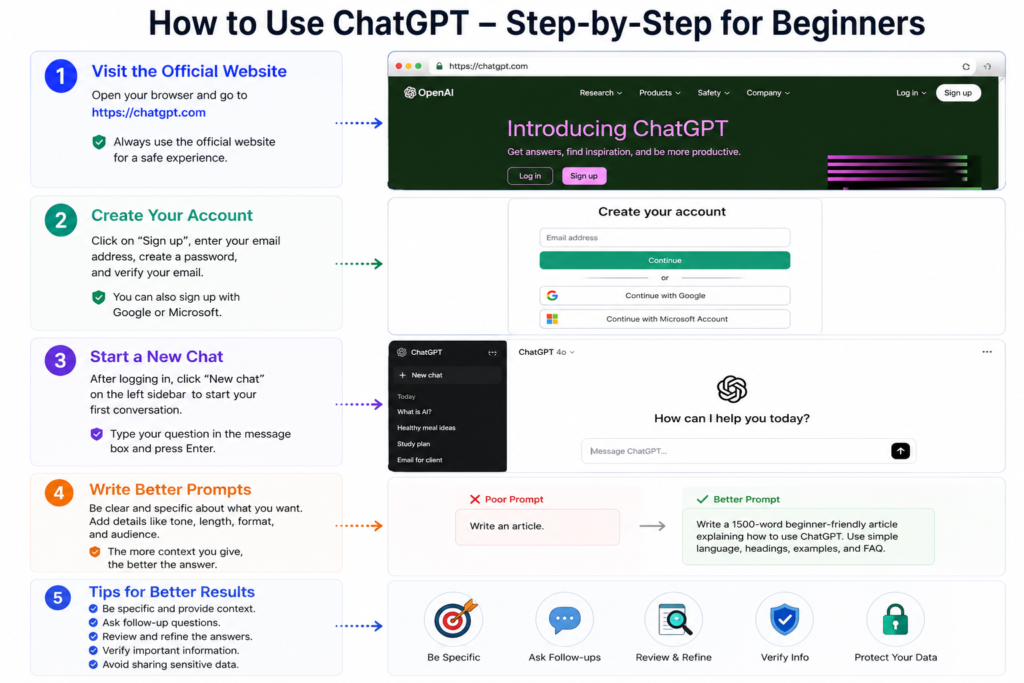
Step 1: Visit the Official Website
Open your browser and go to the official ChatGPT website.
Sign in or create a free account using your email address or a supported sign-in method.
Always use the official website to avoid fake or phishing websites.
Step 2: Create Your Account
Choose Sign Up if you’re a new user.
You may be asked to verify your email address and complete basic account setup.
Once verified, you’ll reach the ChatGPT dashboard.
Step 3: Start Your First Conversation
Click New Chat.
Type a simple question such as:
- What is artificial intelligence?
- Explain photosynthesis.
- Write a professional email.
- Suggest healthy breakfast ideas.
Press Enter and ChatGPT will generate a response.
Step 4: Write Better Prompts
The quality of the answer depends on the quality of your prompt.
Instead of writing:
Write an article.
Try:
Write a 1,500-word beginner-friendly article explaining how to use ChatGPT, using H2 headings, practical examples, and a FAQ section.
Providing context helps the AI generate more useful answers.
Step 5: Refine the Response
If the first answer isn’t exactly what you need, continue the conversation.
Examples:
- Make it shorter.
- Explain in simple English.
- Add examples.
- Rewrite professionally.
- Create a table.
- Translate into Urdu.
Iterating often produces better results.
Step 6: Use ChatGPT for Everyday Tasks
Students can:
- Understand difficult concepts
- Create revision notes
- Practice quizzes
Professionals can:
- Draft emails
- Summarize meetings
- Brainstorm ideas
Freelancers can:
- Write proposals
- Improve client communication
- Generate content outlines
Tips for Better Results
- Be specific about what you want.
- Mention the audience and purpose.
- Ask follow-up questions.
- Review important information before relying on it.
- Avoid sharing sensitive personal information.
Common Mistakes Beginners Make
Asking vague questions
Specific prompts usually produce better answers.
Expecting perfect answers immediately
Sometimes a few follow-up requests are needed to get the desired result.
Using unofficial websites
Always use the official ChatGPT service.
Copying AI output without reviewing it
Edit and fact-check content before publishing or submitting it.
Frequently Asked Questions
Is ChatGPT free?
There is a free version, along with paid plans that provide additional features.
Can ChatGPT replace Google Search?
Not entirely. ChatGPT is useful for explanations and writing, while search engines remain important for finding current information and official sources.
Is ChatGPT safe?
Use it responsibly and avoid sharing passwords, financial information, or other sensitive personal data.
Can students use ChatGPT?
Yes. It can help with learning, brainstorming, and understanding concepts, but students should use it ethically and verify important information.
Conclusion
ChatGPT is a powerful tool that can help with learning, writing, creativity, and productivity. By asking clear questions, refining responses, and verifying important information, beginners can get much more value from it.
The best way to learn is by experimenting with different prompts and discovering which approaches work best for your needs.